Open-Door Vending Cabinets: What to Test Before a Site Trial
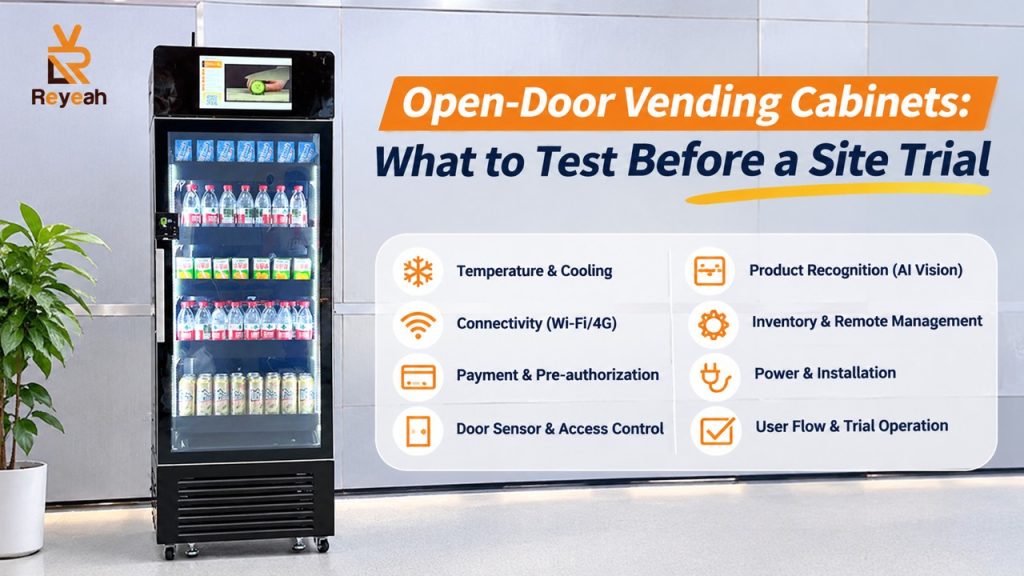
A customer opens an open-door vending cabinet, picks up two products, puts one back and closes the door. The experience looks straightforward. The difficult part is making sure the final basket reflects what the customer kept, and that the payment and receipt agree.
That is the central test for an open-door vending cabinet. Appearance, screen size and shelf capacity matter, but the handling of ordinary shopping behaviour deserves equal attention.
Ask how the open-door vending cabinet builds a basket
Different systems use different methods. Some combine shelf-weight measurements and cameras; others rely on visual recognition or tagged products. For example, Cantaloupe describes weighted shelves and cameras in its Smart Stores, while SandStar describes computer-vision recognition in a smart-cooler configuration. These are examples of different implementations, not specifications shared by every cabinet.
Ask the supplier which method the proposed unit uses and what setup each product requires. Find out whether changing packaging, moving stock or adding a new item requires calibration, new photographs or approval through a support service.
“AI-powered” does not answer these operating questions.
Use a realistic product mix
A demonstration with clearly different bottles is easier to interpret than one with several almost identical flavours. Bring the products you actually intend to sell, including similar-looking items and small packages.
Test ordinary behaviour: taking a single item, taking two together, returning an item to its original place, and changing your mind before closing the door. Ask how the system handles an item placed on a different shelf and what the customer should do.
Record the expected basket before checking the receipt. Keep recognition errors separate from payment failures. Otherwise, a transaction total may look correct by coincidence while the recorded inventory is wrong.
Include awkward but normal conditions
Repeat the test with partly empty shelves. Check the effect of packaging changes, display rearrangements and the lighting at the actual site. If the cabinet is refrigerated, examine the door after normal use and ask how condensation or repeated opening is handled.
Agree on a controlled interruption test with the supplier: loss of connectivity, a door left open, or a service interruption. Do not disconnect equipment in a way that could damage it or compromise food storage. The purpose is to understand the supported recovery process.
Ask whether shopping is prevented when the system cannot establish a reliable basket or payment session. Obtain a clear explanation of any offline mode and its limits.
Make refilling a separate workflow
Staff must be able to add stock without creating customer transactions. Ask to see the refill mode, product setup steps and the inventory adjustment record.
Have a member of your own team perform the procedure using the instructions. Watch where they hesitate. If only the supplier’s demonstrator can load the cabinet correctly, training or documentation still needs work.
For refrigerated food, agree on cleaning, temperature monitoring and the response to a cooling fault with the responsible food-safety professional. The cabinet’s recognition system does not replace those controls.
Decide who resolves a disputed basket
A customer should not need to understand cameras or shelf sensors to report an incorrect charge. Provide a machine identifier, a receipt or transaction reference, and a working support route.
Before the trial, agree which records are available to investigate a dispute, who can access them and how refunds are issued. If images are retained, their purpose, access and retention need to be addressed.
Run the trial for a period that captures normal site use. Review basket accuracy, completed payments, complaints, refill effort and service interruptions together. A cabinet is ready for wider deployment when the operating team can handle exceptions consistently, not simply when a demonstration ends without an error.